Orb, waveforms & bars
The package includes source adaptations of ElevenLabs UI’s Orb shader, Live Waveform, Bar Visualizer, and base Waveform. The selected visual replaces the avatar by default; use visualization={{ type: "avatar" }} for caller photos or initials, or showAvatar to deliberately combine an avatar with a visual. none hides the visual. The Orb uses the upstream shader and bundled noise texture with a lazy-loaded Three.js renderer. Audio visuals borrow existing call streams without opening another microphone. See source attribution and adaptations.
<WebPhone config={config} autoConnect visualization={{ type: "orb", // "avatar" | "orb" | "waveform" | "bars" | "both" | "none" orb: { // Omit colors to follow the phone's theme accent automatically. size: 112, speed: 0.7, seed: 7, }, waveform: { mode: "scrolling", // or "static" for mirrored bars source: "remote", // or "local" for your microphone height: 48, barWidth: 3, barGap: 2, sensitivity: 1.2, fadeEdges: true, }, bars: { barCount: 12, height: 72, centerAlign: true }, }}/>| Configuration | Options / defaults |
|---|---|
visualization.type |
Explicitly overrides features.waveform; otherwise presets retain their waveform defaults. The demo initially shows both. |
orb.colors |
Optional two-color override. Otherwise follows the theme accent with a lighter companion color. |
orb.size, orb.seed |
Size in pixels (112); stable pattern seed (7). |
orb.speed, orb.animate |
Motion multiplier 0–2 (1); animation enabled (true). 0 freezes motion. |
orb.appearance |
Inherits widget appearance, or explicitly choose light / dark. |
waveform.mode, waveform.source |
static / scrolling; remote / local. Default static, remote. |
waveform.barWidth, barGap, barRadius, barHeight, barColor |
Bar geometry/color. Omit color to inherit. |
waveform.sensitivity, smoothingTimeConstant, fftSize |
Defaults 1, 0.8, 256. Invalid FFT sizes fall back to 256. |
waveform.historySize, updateRate |
Scrolling samples (60); minimum milliseconds between audio samples (30). |
waveform.height, fadeEdges, fadeWidth |
Height (48 in the widget), fade enabled (true), edge width (24). |
The Orb moves only during an active, unheld conversation: real local/remote speech drives its talking state; silence produces listening motion. Registration, ringing, microphone initialization, transfer, hold, and ended states keep it still. orb.animate: false, orb.speed: 0, motion: false, and OS reduced motion also stop it. Muting removes local microphone energy; the other participant can still drive the Orb. Live Waveform shows the chosen source. Preview audio motion is explicitly simulated.
Three.js and the bundled texture load only when an Orb is mounted (about 232 KB gzip combined in the demo build); choose avatar, waveform, bars, or none when bundle weight matters. WebGL failure uses a static fallback and leaves calling available. No texture CDN or ElevenLabs API key is needed. The bundled texture uses a data URI; a restrictive CSP needs img-src data: for the shader, otherwise the static fallback is shown.
Lifecycle-aware bars
Section titled “Lifecycle-aware bars”visualization={{ type: "bars", bars: { barCount: 12 } }} maps SIP state to the ElevenLabs connecting/listening sequences and live audio bands:
| SIP / media condition | Bar state | Orb state / motion |
|---|---|---|
| Ready, no call | idle |
Idle, still |
| Registering, reconnecting, or outgoing INVITE | connecting |
Connecting, still |
| Microphone permission or answering | initializing |
Initializing, still |
| Incoming or remote ringing | ringing |
Ringing, still |
| Active, quiet audio | listening |
Listening, moving |
| Active speech from either participant | speaking |
Talking, audio-reactive |
| Transfer pending | thinking |
Thinking, still |
| Local or remote hold | held |
Held, still |
| Completed / failed call | ended / error |
Ended / error, still |
Bars accept barCount (1–32), minHeight / maxHeight percentages, height, centerAlign, color, and animate. They inherit the theme accent. Speech uses actual frequency bands; muted input is excluded. useCallActivity() exposes the same state, input/output levels, and bands for custom UI. getCallVisualState(snapshot, input, output) supplies the pure lifecycle mapping.
For custom layouts, use <CallOrb colors={["#285dab", "#a6cfff"]} /> and <CallWaveform mode="scrolling" /> inside PhoneProvider / PhoneRoot. The standalone <Orb />, <LiveWaveform stream={yourStream} active />, and <Waveform data={samples} /> also work without the phone provider. You own the stream passed to LiveWaveform; it never captures audio on its own.
Use <CallBarVisualizer /> for call-connected bars or <BarVisualizer state="speaking" bands={levels} /> for a standalone visualization. Standalone Orb can animate independently; CallOrb enforces the call lifecycle.
See the difference
Section titled “See the difference”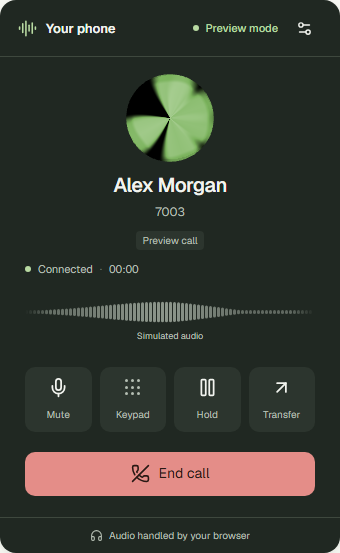
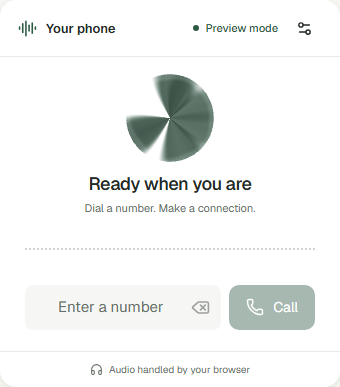
Screenshots show simulated calls. Live visualizations use the actual call audio.