Contacts & speed dial
As people type on the keypad, the phone suggests matching contacts. Digits match numbers anywhere, and also names by keypad letters, the way phone dialers do: 2 6 finds Alex Morgan by initials, and 6 6 7 finds Morgan. The best match appears as a pill under the number with the matched letters and digits highlighted; +N more opens the rest, each with its own call button.
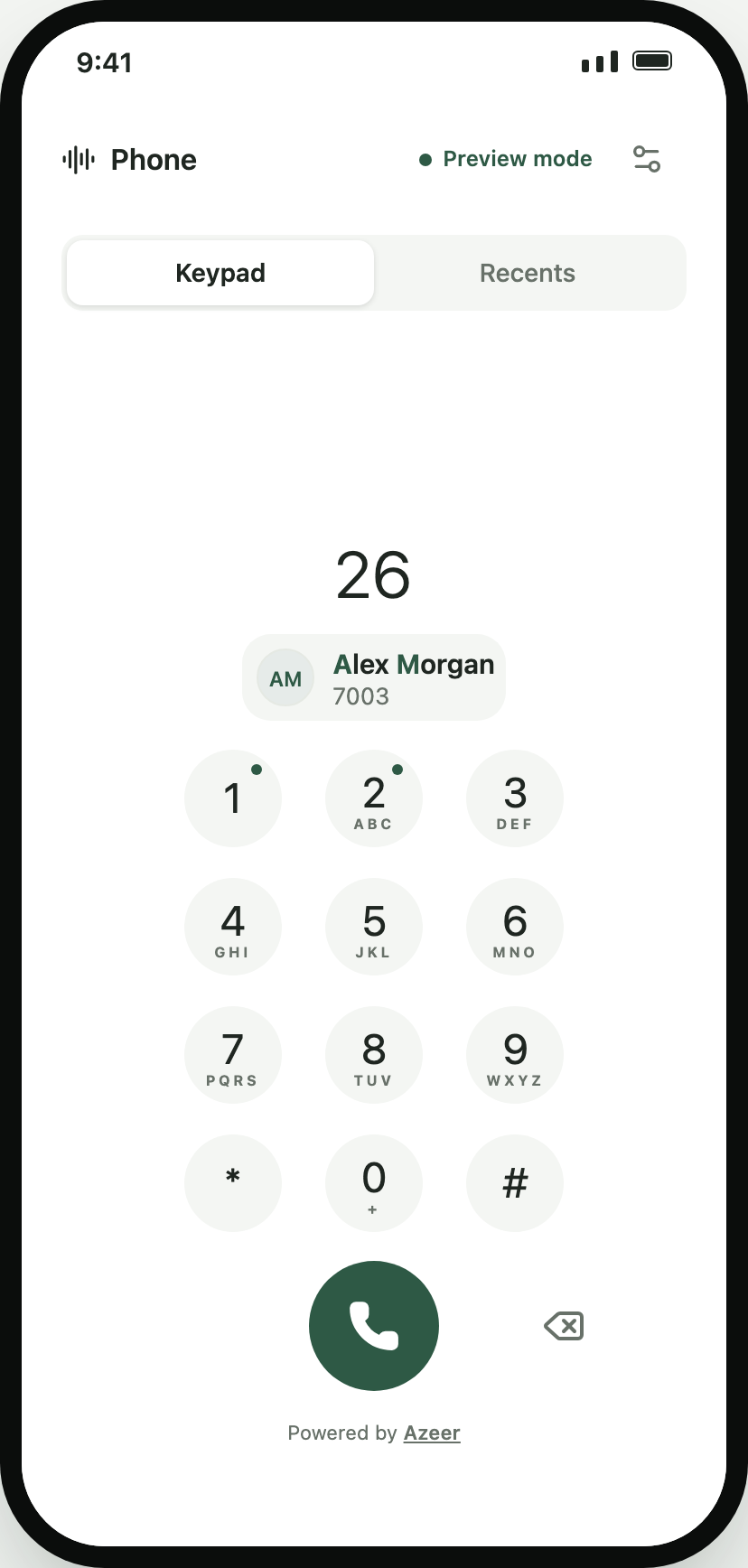
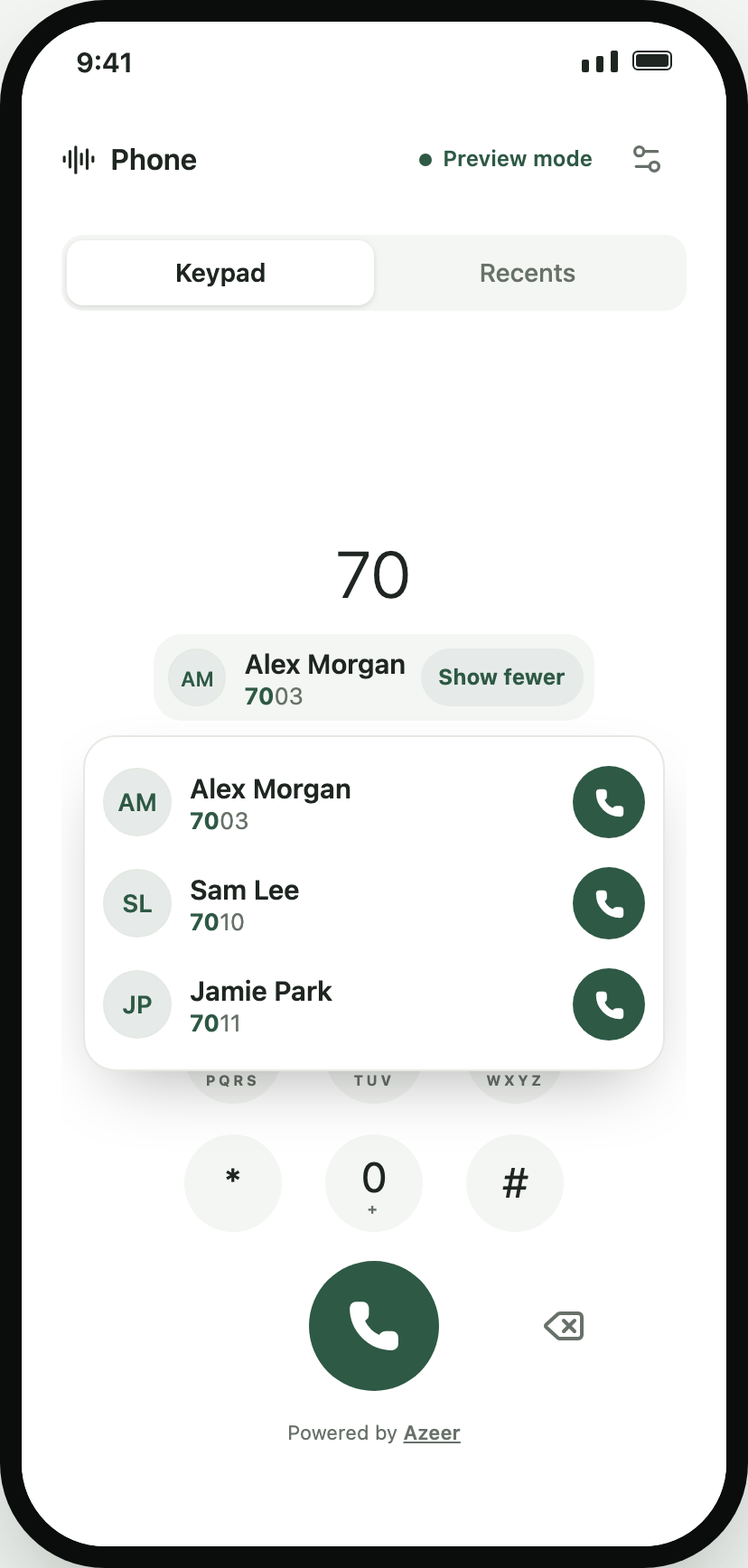
<SipPhone config={config} contacts={[ { name: "Alex Morgan", number: "7003", avatarUrl: "https://…", tags: ["VIP"] }, { name: "Front desk", number: "100" }, ]} speedDial={{ "1": { name: "Voicemail", number: "*97" }, "2": "100" }}/>Choosing a suggestion fills the number and attaches that identity to the call, so the call screen, island, callbacks, and Recents show the name, photo, and tags. An exact number match is named under the display without tapping.
Sources
Section titled “Sources”| Prop | Use it for |
|---|---|
contacts |
A list you already have in memory: favourites, a team directory, a CRM page |
searchContacts |
A large or remote directory: (query) => Caller[] | Promise<Caller[]>, debounced 120 ms; stale answers are ignored |
| Recents | Included automatically from this client’s call history (suggestions={{ recents: false }} to turn off) |
suggestions |
false to disable; { limit: 8 } to show more (default 5) |
Your list ranks above Recents, and duplicates are merged by number.
Device contacts with expo-contacts
Section titled “Device contacts with expo-contacts”import * as Contacts from "expo-contacts";
async function searchDeviceContacts(query: string) { const { status } = await Contacts.requestPermissionsAsync(); if (status !== "granted") return []; const { data } = await Contacts.getContactsAsync({ fields: [Contacts.Fields.PhoneNumbers] }); return data.flatMap((contact) => (contact.phoneNumbers ?? []).map((phone) => ({ name: contact.name, number: phone.number ?? "" })), );}
<SipPhone config={config} searchContacts={searchDeviceContacts} />;Load and cache contacts once in a real app; the function runs as digits change. Ask for the contacts permission only when your users expect it.
Matching rules
Section titled “Matching rules”| Typed | Matches | Rank |
|---|---|---|
7003 |
The exact number | Highest |
415 |
Numbers starting with the digits (formatting is ignored) | High |
253 |
First-name prefix by keypad letters (Alex Morgan) | High |
667 |
Later word prefix (Alex Morgan) | Medium |
26 |
Initials (Alex Morgan) | Medium |
03 |
Digits anywhere in a number | Lower |
Accents are folded (Zoë matches 96). Use matchContacts(query, { contacts, recents }, limit) and toKeypadDigits(text) directly for your own UI, or useContactSuggestions() with <ContactSuggestions /> inside a PhoneProvider.
Speed dial
Section titled “Speed dial”speedDial maps keys 1–9 to a contact or a bare number. Long-pressing the key on an empty keypad calls it; a small dot marks assigned keys, and screen readers hear “Long press to call Voicemail”. Once someone is typing a number, long-press behaves like a normal key, so speed dial never interrupts dialing. Long-press 0 still types +.
Keypad options
Section titled “Keypad options”| Prop | Default | Effect |
|---|---|---|
keypadLetters |
true |
Show ABC/DEF under the digits |
theme.keyBackground, theme.keyForeground |
surface / foreground | Key colours |
theme.controlShape |
circle |
rounded for squircle-like keys |