Dynamic island
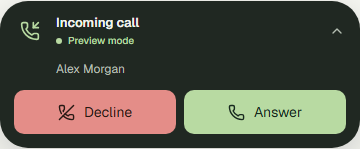
WebPhoneIsland keeps SIP connection status visible in a small capsule. Open it to dial; let it expand for incoming calls, or show compact answer/decline actions. Collapsing preserves the call, dial input, and consumed automatic-call request.
Dock to the window
Section titled “Dock to the window”import { WebPhoneIsland, type SipConfig } from "@azeer-ui-widget/react-phone";
export function FloatingPhone({ config }: { config: SipConfig }) { return ( <WebPhoneIsland config={config} autoConnect scope="window" placement="bottom-right" offset={{ x: 24, y: 24 }} incomingBehavior="expand" visualization={{ type: "orb" }} theme={{ appearance: "dark" }} /> );}Window mode uses CSS fixed positioning. Mount it near your application root, outside ancestors with transforms, filters, clipping, or containment that create a different fixed-position context. It respects device safe-area insets. The space around the phone remains clickable.
Dock to a container
Section titled “Dock to a container”<section style={{ position: "relative", height: 640 }}> <YourWorkspace /> <WebPhoneIsland config={config} autoConnect scope="container" placement="top-center" offset={16} incomingBehavior="notify" /></section>The parent needs position: relative and a usable height. The expanded phone scrolls internally when space is limited. Reserve enough room for the collapsed capsule and edge spacing. Island docking replaces PhoneWidget’s free-drag behavior.
Choose incoming behavior
Section titled “Choose incoming behavior”incomingBehavior |
On a new incoming call | Answering |
|---|---|---|
"expand" (default) |
Expands the complete phone | Standard Answer / Decline controls |
"notify" |
Keeps the phone collapsed; shows caller and compact actions | Answer opens the phone and requests the microphone |
"manual" |
Keeps the capsule collapsed with an incoming label and caller identity | User opens the phone to answer |
An already-open phone stays open in every mode. None of these modes automatically answers. Presentation does not mute ringing; use tones={{ events: { incoming: false } }} to turn off that cue.
Incoming calls do not take keyboard focus by default. Set focusOnIncoming to focus Answer when an incoming call expands the phone. Escape collapses it and restores the prior focus when available. A live announcement identifies the incoming caller.
Outgoing calls
Section titled “Outgoing calls”Click the capsule to open the dialer. defaultNumber prefills it. autoDial starts one attempt after registration and expands the island by default:
<WebPhoneIsland config={config} autoConnect defaultNumber="7003" autoDial autoDialKey="support-request-42" expandOnOutgoing/>Set expandOnOutgoing={false} to keep externally initiated calls in the capsule. Collapsing and reopening does not redial. See the automatic-call contract for remount and busy-line behavior.
Configuration
Section titled “Configuration”| Prop | Default | Meaning |
|---|---|---|
scope |
"window" |
Fixed to the window or absolute within "container" |
placement |
"bottom-right" |
top-left, top-center, top-right, bottom-left, bottom-center, bottom-right |
offset |
20 |
CSS pixels, either a number or { x, y }; clamped to 0–500 |
zIndex |
50 |
Stacking order within the host’s stacking context |
incomingBehavior |
"expand" |
Full phone, compact notification, or manual opening |
focusOnIncoming |
false |
Opt into focusing Answer after incoming expansion |
expandOnOutgoing |
true |
Expand for a new outgoing call |
collapseAfterCall |
true |
Collapse after a clean call end; errors stay available |
collapseDelayMs |
1400 |
Delay before collapse, clamped to 0–30000 ms |
defaultExpanded |
false |
Initial state for uncontrolled use |
expanded |
unset | Host-controlled open/closed state |
onExpandedChange(next, reason) |
unset | Reasons: user, incoming, outgoing, answered, ended |
The widget’s preset, theme, controls, caller, visualization, sound, motion, branding, callbacks, and auto-dial options are also supported. Width and height morphing obey motion and the user’s reduced-motion preference.
Control expansion from your app
Section titled “Control expansion from your app”const [expanded, setExpanded] = useState(false);
<WebPhoneIsland config={config} autoConnect expanded={expanded} onExpandedChange={(next, reason) => { setExpanded(next); // Required in controlled mode. console.info("Phone presentation", reason); }}/>;With an existing provider, use PhoneIsland instead of WebPhoneIsland. This shares one line with the rest of your UI:
<PhoneProvider config={config} autoConnect> <YourWorkspace /> <PhoneIsland placement="bottom-center" incomingBehavior="notify" /></PhoneProvider>Closing the island never disconnects, rejects, or hangs up. Use its explicit call controls or client.hangup() to end a call.